
How does "Thank You For Registering Page" work?
The Thank You for Registering Page is shown in a default way to clients after they register at Automated Webinar events, either through our registration page template or embed widget.
Its available to customize fully, by adding items into field at the page, or even specify video/images replacers you've uploaded to your Library, tracking is also possible separately (as shown below)
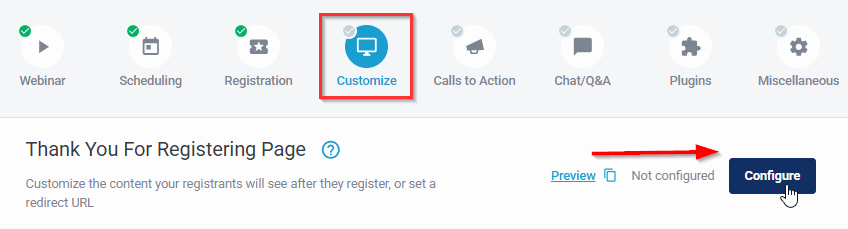
A Page Redirect is also an available option to setup, for your 3rd party pages (as shown below)
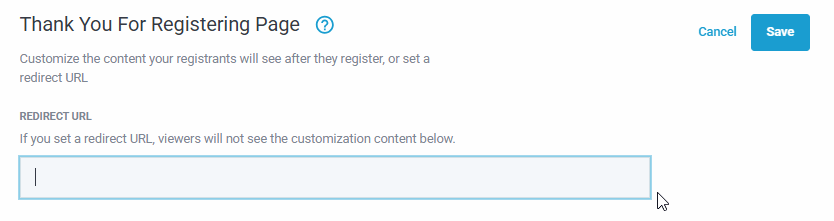
By providing your webpage URL link in the field shown above.
Important note: Any direct links back to webinar event, would be handled through email reminders typically, when a redirect is setup here. Or developed at separately at your web pages (outside of our scope)
Some of the important parameters you can pass when a redirect is setup are listed below,
(* Phone number & IP are not available to setup in this way)
{name} for passing name

{email} for registrant's email address

{autoLoginId} for passing the unique id for attendee

{id} for the event shortid itself

{registeredDate} will pass the date of the webinar for which someone registered

{registeredTime} will pass the time of the webinar for which someone registered

{replayId} for passing the replay id after webinar ends.

{utm_source}, {utm_campaign}, {utm_content}, {utm_medium}, {utm_term} for passing utm parameters
Pro tip: if you are using 3rd party tracking apps (like WickedReports, etc.)
You can use the URL listed below for your redirect here at our pages, or setup to your pages with that same appended tag, info.
https://joinnow.live/t/{id}?id={autoLoginId}&email={email}
If you have any other questions or need any assistance, just let us know at the chatbox!
Related Articles: