
How does "Minutes Until Webinar" work?
Minutes to Webinar is available in Advanced Scheduling section, it allows you to show webinar time X minutes after landing on the registration page.
So for example, if you want to run a webinar 2 minutes after someone lands on your registration page, you can setup as shown here below.
Note: in a typical case Just in Time (at Easy scheduling) would be disaabled when this method is chosen, as it will display along with, when not disabled.
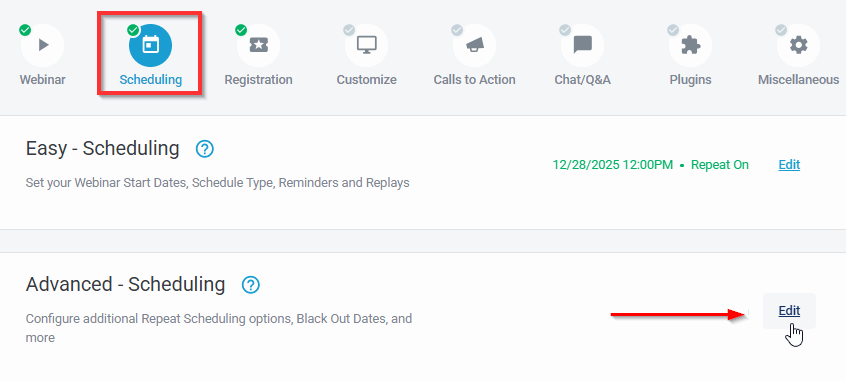
At the following page you will find Minutes to Webinar available to Turn ON & set however you like shown below,
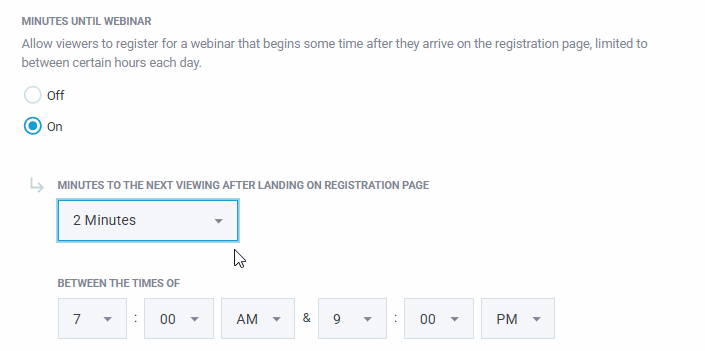
You can choose between 1, 2, 5, 10, 15, 30, 45, 60 minutes. You can also choose between times when this option should be displayed in the registration page.
Important to Note: Its recommended to provide enough time with this option for clients to read & register to you page, clients may need to refresh registration page to get a new time to register to events. Anything under 5 minutes would be recomended for registration to be setup in some more automated method.
If you want to avoid strange looking times (from landing at your registration page) being shown at Pick a Time Scheduling, you can check how to Hide Times > HERE
Or let us know at the chatbox once you have setup something to assist, we're happy to help!