How to enable Facebook reminders (Deprecated)
The Facebook Reminder feature is no longer supported due to changes in Facebook’s platform and policies. Because of these changes, StealthSeminar can no longer send webinar reminders through Facebook.
There are several more reliable reminder methods available:
Recommended Reminder Alternatives
1. StealthSeminar Built-In Email Reminders
StealthSeminar automatically sends reminder emails to registrants. These emails typically include:
- Registration confirmation
- 60-minute reminder
- 5-minute reminder
- Replay/follow-up emails
You can customize these emails in the Webinar Editor → Emails section.
This is the easiest and most reliable reminder method and does not require any third-party tools.
2. Autoresponder Reminders (Recommended for Advanced Users)
You can also send reminders using your email marketing platform, such as:
- Mailchimp
- ActiveCampaign
- AWeber
- GetResponse
- ConvertKit
- Other autoresponders
Using an autoresponder allows you to create a more advanced reminder schedule, such as:
- 48 hours before the webinar
- 24 hours before
- 6 hours before
- 1 hour before
- 15 minutes before
- 5 minutes before
Many users use both StealthSeminar reminders + autoresponder reminders together for higher attendance rates.
3. SMS Reminders (Optional)
If you want a reminder method similar to Facebook notifications, SMS reminders are a great alternative. SMS messages typically have very high open rates and can significantly improve webinar attendance.
SMS reminders can be sent using third-party SMS platforms integrated with your registration system.
The article below is kept for historical reference only.
Please note: the reminder can only be sent 5 minutes before the webinar.
To enable FB reminder, first of all, go and edit your webinar

Click on Scheduling in the menu

Then in Easy - Scheduling, scroll down, in Webinar Reminders section, find Stealth Facebook Reminders, and check that option. You should now see something like this
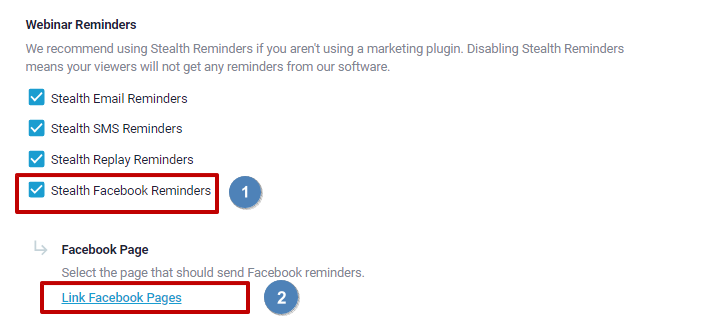
Here is a quick video on how to Link Facebook Pages
After you are done adding your page, go to Customize menu.

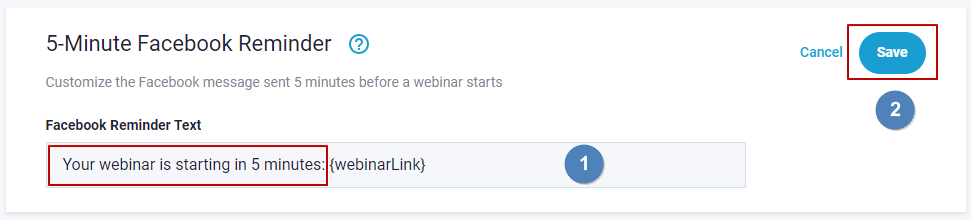
Scroll down until you find 5-Minute Facebook Reminder

Click on configure and edit the message to what you want. Please make sure not to change the webinar link custom field. Once you are done, hit Save